One Planning page instead of three
Appointments, Dispatching and the construction project timeline are now one page: your people down the side, time from left to right – from a single day to the whole year.
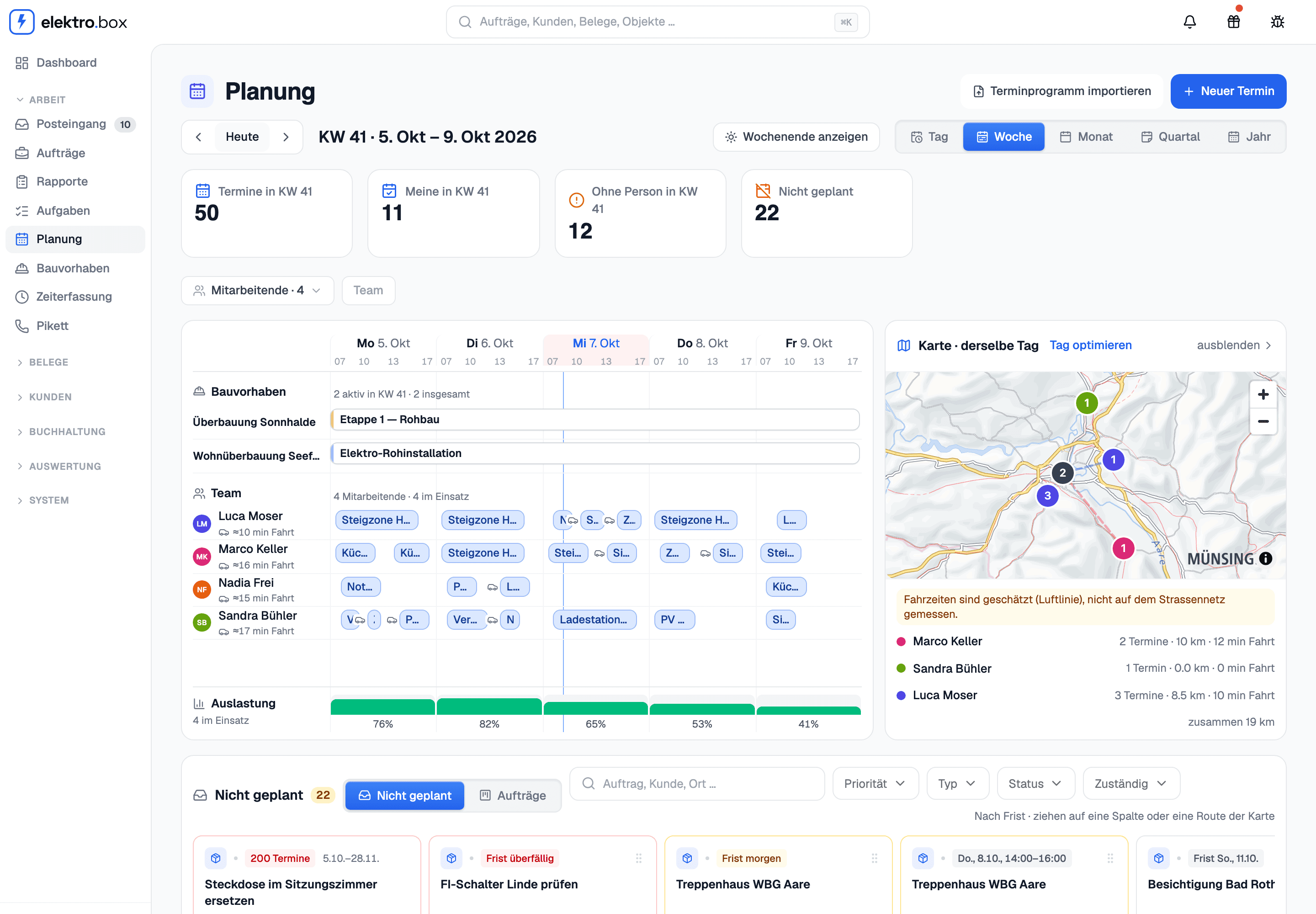
Under «Planning» every person has a row of their own. Above them run the stages of your construction projects; below, the utilisation shows how full each day is already booked. Day, Week, Month, Quarter and Year switch the view without leaving the page. Anyone who opens the old Appointments or Dispatching pages lands here.
Whatever is not scheduled yet – tasks, appointments with nobody on them, Rapporte without an appointment – waits underneath under «Not scheduled», sorted by deadline. Drag a card onto a person and a time and it is scheduled; a click on an empty spot creates a new Rapport there. In the day and week views the map beside the board shows that day's routes, and «Optimise day» proposes an order that drives as little as possible – nothing changes until you accept it.